
What is Nano Banana 2.1?
Google’s update to Nano Banana 2 focuses on efficient image generation and conversational editing. The API model ID is gemini-nano-banana-2.1. DeepMind published its model card on October 6, 2026.
More natural images, clearer designs and more consistent subjects. Google’s updated model for efficient image generation and editing.
A Nano Banana 2.1 example from Google DeepMind, showing visual design and text in images.
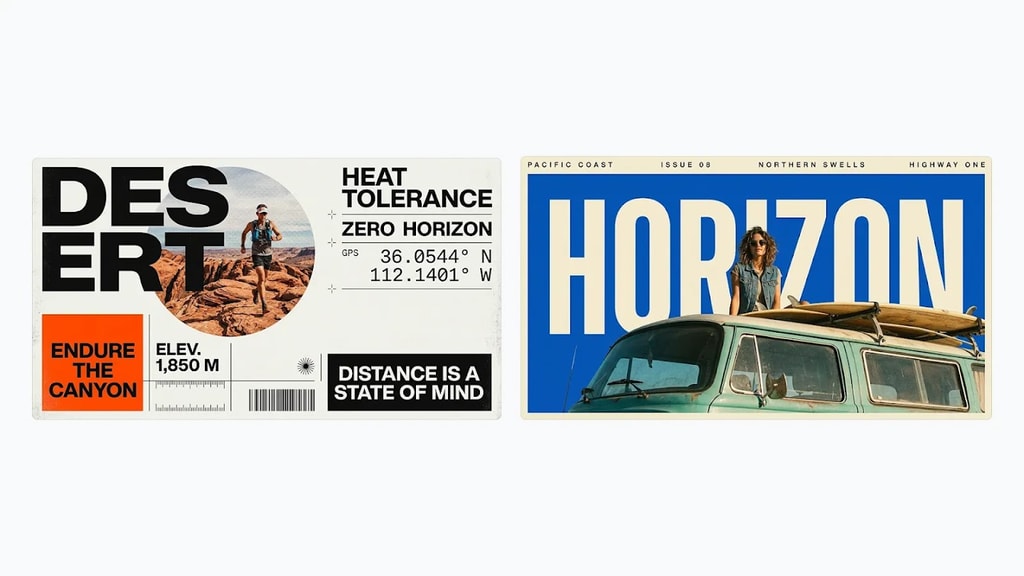
Google features these posters in the Nano Banana 2.1 visual design update, combining large headlines, photography and information panels. This is an official example, not a PixZoo generation.
Image: Google DeepMind · View original exampleCreative improvements described in Google’s documentation and demonstrations.
Improves text rendering, infographic layouts and prompt adherence for posters, packaging and content graphics. Check small text, spelling and numbers.
Google supports up to 14 reference images and emphasizes character and object consistency across edits, useful for exploring series and product scenes.
Official demonstrations show changing environments while preserving subjects with mask or sketch guidance. Complex blending can still introduce artifacts.
Google lists 1K, 2K and 4K output and improved tiling on wide formats, alongside better materials, lighting and fine detail.
Google’s update to Nano Banana 2 focuses on efficient image generation and conversational editing. The API model ID is gemini-nano-banana-2.1. DeepMind published its model card on October 6, 2026.
Use Nano Banana 2.1 on this page for text-to-image and reference editing.
Nano Banana 2.1 retains the efficient Flash positioning while improving visual quality, layouts, prompt adherence and subject consistency across edits. It updates Nano Banana 2; it is not a renamed Nano Banana Pro.
The standard model offers up to 14 reference images, 1K / 2K / 4K and aspect ratios, using auto aspect ratio by default; the selected publisher resolution applies. Thinking uses the provider default medium; there is no Thinking selector yet.
The standard request protocol supports Web Search grounding, but the publisher has no search toggle yet. Independent Image Search controls are also unavailable. Web Search adds 1 credit per generation.
Review the current credit cost in the publisher before submitting. Batch generation submits separate tasks and charges by the number of tasks.
Google notes possible spelling, small face and detail errors, as well as factual mistakes in infographics. Complex edits, spatial positioning, 3D reasoning and pose changes remain limited. Review outputs before use.